
This quick tutorial explains how to submit your Blogger blog’s sitemap to Google Search Console. Every Blogger blog has a sitemap file automatically created by Blogger. You can access it by adding /sitemap.xml to the end of your blog URL.
For example: https://YOURBLOGNAME.blogspot.com/sitemap.xml
Follow the steps below to submit your Blogger sitemap to Google Search Console:
1. Go to Google Search Console and sign in with your Google account.
2. Select your blog from the property list (top-left dropdown).
Note: If your blog isn't added yet, click "Add Property" and enter your full blog URL (e.g., https://yourblogname.blogspot.com), then follow the verification steps.
3. In the left sidebar, click on "Indexing" → "Sitemaps".

4. Under "Add a new sitemap", enter your full sitemap URL like this:
https://YOURBLOGNAME.blogspot.com/sitemap.xml
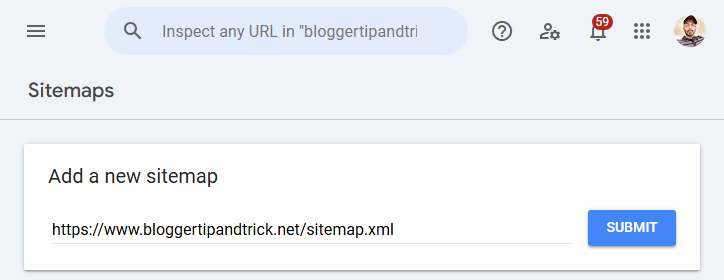
5. Then click the Submit button.
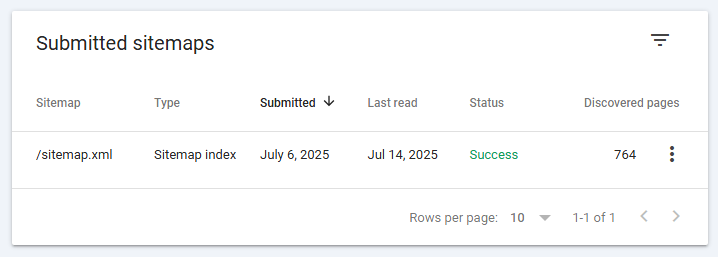
Your Blogger sitemap has now been submitted to Google. After processing, you'll be able to view indexing status, discovered URLs, and any crawling errors in the Search Console dashboard.
Note: If you're using a custom domain (like https://www.mycustomdomain.com), your sitemap URL would be:
https://www.mycustomdomain.com/sitemap.xml
ok thanks ..
One of the most Important website i have ever visited.
Sajjad Amin.
Thanx for the post as i would be beneficial for many bloggers.The post was clearly written which will be very useful for new bloggers.Visit my blog www.techieway.blogspot.com for more....
I could not find the 'Add General Web Sitemap' button but there is a "Submit a Sitemap' button. I have submitted my feeds but both the atom and rss feeds have the same format which is atom feed. I don't know how to change this. My site status is X. Please do advise on how to go on with this. Thanks!