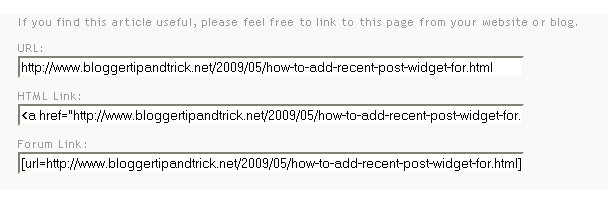
This tutorial will explain how to create a widget, for your visitors to link back to your article/blogger post.This was created by me(http://www.bloggertipandtrick.net/) and previously I had installed this widget to this site.Many visitors ask from me how to add this widget to their blogger blogs and so I decided to explain it.This widget will show 3 codes (Blog Post URL,HTML code to embed your post to a website,Forum Link to embed your post to a forum) below your blogger post.If you like to add this widget to your blogger blog,then follow the steps given below.
1.Login to your blogger dashboard--> layout- -> Edit HTML
2.Scroll down to where you see </head> tag .
3.Copy below code and paste it just before the </head> tag .
<style type='text/css'>
.about-article{
background-color:#f9f9f9;
padding-bottom:5px;
padding-left:20px;
font-size:11px;
}
.about-article input{
background-color:#ffffff;
}
</style>
4.Now find below code:
<data:post.body/>
5.Copy below code and paste it just after the <data:post.body/>.
<b:if cond='data:blog.pageType == "item"'> <div class="about-article"><p>If you find this article useful, please feel free to link to this page from your website or blog.</p><p class="noborder"><label for="aa-url">URL:</label><br /><input size="80" readonly="readonly" onclick="this.focus();this.select();" type="text" id="aa-url" value="<data:post.url/>" /></p><p><label for="aa-forum">HTML Link:</label><br /><input size="80" readonly="readonly" onclick="this.focus();this.select();" type="text" id="aa-forum" value="<a href=&quot;<data:post.url/>&quot;><data:post.title/></a>" /></p><p> <label for="aa-forum">Forum Link:</label><br /> <input size="80" readonly="readonly" onclick="this.focus();this.select();" type="text" id="aa-forum" value="[url=<data:post.url/>]/<data:post.title/>[/url]" /></p> <p align='center'><a href='https://www.bloggertipandtrick.net/' style='display:none;' target='_blank'>Widget by BloggerTipAndTrick</a></p> </div><br/> </b:if>
NOTE : Don't change anything in above code.
6.Save your template and you are done.
the last out this hack...hihihihi
how to make a embedded code like you do on your post like the notebook background?..
thanks very much Mr. Lasantha, i like it this tutorials..
This is great for posts but what about blogger stand alone pages is there a code available for those?
thanks sir
thank for ur information
Hey, I am pleased to learn this from your site.. Thanks your site is awesome
Thanks for the tips. Been looking how to put these codes into my blog.
i used all the step but why my site is not display these embedded link
I don't have the code (data:post.body/) for the template I use (yours WPZine)... What should I do then ? Thank you.
first you need to click on "Expand Widget Templates".
thanks i need it to my blog