Mootools Featured Posts Auto Slider to Blogger/Websites

a7d2ac40d88e06b192ce64ba9682a1d2delicious

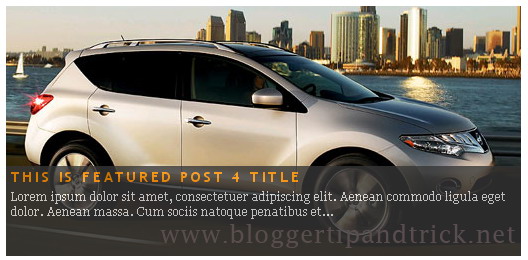
This tutorial will show you how to add Mootools Featured Posts Slider into blogger or any other web site.You can look at the DEMO page of this Mootools Featured Posts Slider.Now if you like to add this slider to your site then follow the steps given below.

1.Login to your blogger dashboard--> layout- -> Edit HTML

2.Scroll down to where you see </head> tag .

3.Copy below code and paste it just before the </head> tag .
<script src='https://ajax.googleapis.com/ajax/libs/mootools/1.3.1/mootools-yui-compressed.js' type='text/javascript'></script>

<script type='text/javascript'>
//<![CDATA[

//MooTools More, <http://mootools.net/more>. Copyright (c) 2006-2008 Valerio Proietti, <http://mad4milk.net>, MIT Style License.

eval(function(p,a,c,k,e,r){e=function(c){return(c<a?'':e(parseInt(c/a)))+((c=c%a)>35?String.fromCharCode(c+29):c.toString(36))};if(!''.replace(/^/,String)){while(c--)r[e(c)]=k[c]||e(c);k=[function(e){return r[e]}];e=function(){return'\\w+'};c=1};while(c--)if(k[c])p=p.replace(new RegExp('\\b'+e(c)+'\\b','g'),k[c]);return p}('11.36=f 12({1M:11,a:{1m:"2s"},X:8(B,A){7.P("1v",8(){7.1w=(7.13["k"+7.1x.37()]!=0);b(7.1w&&2t.2u.38){7.e.39().2v(7.13)}},n);7.e=7.2w=$(B);7.Q(A);9 C=7.e.1n("13");7.13=C||f 1c("3Y",{3Z:$1Y(7.e.40("14","1N"),{41:"42"})}).43(7.e);7.e.1Z("13",7.13).1d("14",0);7.l=[];7.1w=n},2s:8(){7.14="14-15";7.1x="21";7.k=7.e.2x},22:8(){7.14="14-16";7.1x="23";7.k=7.e.2y},17:8(A){7.e.1d(7.14,A[0]);7.13.1d(7.1x,A[1]);c 7},1O:8(E,D,C){9 B=[];9 A=2;A.3a(8(F){B[F]=11.1O(E[F],D[F],C)});c B},h:8(B,E){b(!7.z(Y.2z,B,E)){c 7}7[E||7.a.1m]();9 D=7.e.1e(7.14).1P();9 C=7.13.1e(7.1x).1P();9 A=[[D,C],[0,7.k]];9 G=[[D,C],[-7.k,0]];9 F;1Q(B){o"R":F=A;1f;o"3b":F=G;1f;o"1R":F=(7.13["k"+7.1x.37()]==0)?A:G}c 7.Q(F[0],F[1])},3c:8(A){c 7.h("R",A)},3d:8(A){c 7.h("3b",A)},2A:8(A){7[A||7.a.1m]();7.1w=j;c 7.17([-7.k,0])},2B:8(A){7[A||7.a.1m]();7.1w=n;c 7.17([0,7.k])},1R:8(A){c 7.h("1R",A)}});1c.44.r={17:8(B){9 A=7.1n("r");b(A){A.Z()}c 7.3e("r").1Z("r:a",$1Y({2C:"Z"},B))},2D:8(A){b(A||!7.1n("r")){b(A||!7.1n("r:a")){7.17("r",A)}7.1Z("r",f 11.36(7,7.1n("r:a")))}c 7.1n("r")}};1c.1o({r:8(D,E){D=D||"1R";9 B=7.2D("r"),A;1Q(D){o"2A":B.2A(E);1f;o"2B":B.2B(E);1f;o"1R":9 C=7.1n("r:2E",B.1w);B[(C)?"3d":"3c"](E);7.1Z("r:2E",!C);A=n;1f;45:B.h(D,E)}b(!A){7.3e("r:2E")}c 7}});11.46=f 12({1M:11,a:{k:{x:0,y:0},3f:n},X:8(B,A){7.e=7.2w=$(B);7.Q(A);9 D=7.Z.M(7,j);b($10(7.e)!="e"){7.e=$(7.e.24().25)}9 C=7.e;b(7.a.3f){7.P("h",8(){C.P("2F",D)},n);7.P("1v",8(){C.18("2F",D)},n)}},17:8(){9 A=1y.3g(Y);7.e.3h(A[0],A[1])},1O:8(E,D,C){9 B=[];9 A=2;A.3a(8(F){B.26(11.1O(E[F],D[F],C))});c B},h:8(C,H){b(!7.z(Y.2z,C,H)){c 7}9 E=7.e.3i(),F=7.e.47();9 B=7.e.3j(),D={x:C,y:H};S(9 G R D){9 A=F[G]-E[G];b($1z(D[G])){D[G]=($10(D[G])=="2G")?D[G].m(0,A):A}s{D[G]=B[G]}D[G]+=7.a.k[G]}c 7.Q([B.x,B.y],[D.x,D.y])},48:8(){c 7.h(j,0)},49:8(){c 7.h(0,j)},4a:8(){c 7.h("1A",j)},4b:8(){c 7.h(j,"1B")},4c:8(B){9 A=$(B).27(7.e);c 7.h(A.x,A.y)}});11.3k=f 12({1M:11.4d,X:8(B,A){7.2H=7.2w=$$(B);7.Q(A)},1O:8(G,H,I){9 C={};S(9 D R G){9 A=G[D],E=H[D],F=C[D]={};S(9 B R A){F[B]=7.Q(A[B],E[B],I)}}c C},17:8(B){S(9 C R B){9 A=B[C];S(9 D R A){7.4e(7.2H[C],D,A[D],7.a.2I)}}c 7},h:8(C){b(!7.z(Y.2z,C)){c 7}9 H={},I={};S(9 D R C){9 F=C[D],A=H[D]={},G=I[D]={};S(9 B R F){9 E=7.4f(7.2H[D],B,F[B]);A[B]=E.4g;G[B]=E.4h}}c 7.Q(H,I)}});9 1C=f 12({2J:[2K,2L],a:{1p:6,2I:"4i",1g:j,2M:n,m:j,28:j,29:j,1q:j,U:{x:"16",y:"15"}},X:8(){9 B=1y.2C(Y,{a:4j.10,e:$4k});7.e=$(B.e);7.t=7.e.24();7.2N(B.a||{});9 A=$10(7.a.28);7.2O=(A=="4l"||A=="4m")?$$(7.a.28):$(7.a.28)||7.e;7.19={l:{},2P:{}};7.p={h:{},l:{}};7.2a=(2t.2u.4n)?"4o":"2b";7.v={h:7.h.M(7),z:7.z.M(7),V:7.V.M(7),1h:7.1h.M(7),Z:7.Z.M(7),2c:$2Q(j)};7.3l()},3l:8(){7.2O.P("2b",7.v.h);c 7},4p:8(){7.2O.18("2b",7.v.h);c 7},h:8(C){b(7.a.1q){C.1q()}7.u("4q",7.e);7.19.h=C.N;9 A=7.a.m;7.m={x:[],y:[]};S(9 D R 7.a.U){b(!7.a.U[D]){3m}b(7.a.2M){7.p.l[D]=7.e.1e(7.a.U[D]).1P()}s{7.p.l[D]=7.e[7.a.U[D]]}b(7.a.29){7.p.l[D]*=-1}7.19.2P[D]=C.N[D]-7.p.l[D];b(A&&A[D]){S(9 B=2;B--;B){b($1z(A[D][B])){7.m[D][B]=$2Q(A[D][B])()}}}}b($10(7.a.1g)=="2G"){7.a.1g={x:7.a.1g,y:7.a.1g}}7.t.2R({1D:7.v.z,2d:7.v.Z});7.t.P(7.2a,7.v.2c)},z:8(A){b(7.a.1q){A.1q()}9 B=i.O(i.4r(i.3n(A.N.x-7.19.h.x,2)+i.3n(A.N.y-7.19.h.y,2)));b(B>7.a.1p){7.Z();7.t.2R({1D:7.v.V,2d:7.v.1h});7.u("h",7.e).u("1p",7.e)}},V:8(A){b(7.a.1q){A.1q()}7.19.l=A.N;S(9 B R 7.a.U){b(!7.a.U[B]){3m}7.p.l[B]=7.19.l[B]-7.19.2P[B];b(7.a.29){7.p.l[B]*=-1}b(7.a.m&&7.m[B]){b($1z(7.m[B][1])&&(7.p.l[B]>7.m[B][1])){7.p.l[B]=7.m[B][1]}s{b($1z(7.m[B][0])&&(7.p.l[B]<7.m[B][0])){7.p.l[B]=7.m[B][0]}}}b(7.a.1g[B]){7.p.l[B]-=(7.p.l[B]%7.a.1g[B])}b(7.a.2M){7.e.1d(7.a.U[B],7.p.l[B]+7.a.2I)}s{7.e[7.a.U[B]]=7.p.l[B]}}7.u("V",7.e)},Z:8(A){7.t.18("1D",7.v.z);7.t.18("2d",7.v.Z);b(A){7.t.18(7.2a,7.v.2c);7.u("Z",7.e)}},1h:8(A){7.t.18(7.2a,7.v.2c);7.t.18("1D",7.v.V);7.t.18("2d",7.v.1h);b(A){7.u("1v",7.e)}}});1c.1o({4s:8(A){c f 1C(7,$2e({U:{x:"23",y:"21"}},A))}});1C.3o=f 12({1M:1C,a:{1S:[],1a:j},X:8(C,B){7.Q(C,B);7.1S=$$(7.a.1S);7.1a=$(7.a.1a);b(7.1a&&$10(7.1a)!="e"){7.1a=$(7.1a.24().25)}C=7.e;9 D=C.1e("1N");9 A=(D!="4t")?D:"4u";b(C.1e("16")=="3p"||C.1e("15")=="3p"){C.1N(C.27(C.3q))}C.1d("1N",A);7.P("h",8(){7.2f()},n)},h:8(B){b(7.1a){9 D=7.e,J=7.1a,E=J.3r(D.3q),F={},A={};["15","1A","1B","16"].1r(8(K){F[K]=J.1e("4v-"+K).1P();A[K]=D.1e("14-"+K).1P()},7);9 C=D.2y+A.16+A.1A,I=D.2x+A.15+A.1B;9 H=[E.16+F.16,E.1A-F.1A-C];9 G=[E.15+F.15,E.1B-F.1B-I];7.a.m={x:H,y:G}}7.Q(B)},3s:8(B){B=B.3r();9 A=7.19.l;c(A.x>B.16&&A.x<B.1A&&A.y<B.1B&&A.y>B.15)},2f:8(){9 A=7.1S.4w(7.3s,7).3t();b(7.1s!=A){b(7.1s){7.u("4x",[7.e,7.1s])}b(A){7.1s=A;7.u("4y",[7.e,A])}s{7.1s=1E}}},V:8(A){7.Q(A);b(7.1S.2g){7.2f()}},1h:8(A){7.2f();7.u("4z",[7.e,7.1s]);7.1s=1E;c 7.Q(A)}});1c.1o({4A:8(A){c f 1C.3o(7,A)}});1F.2S=f 12({1M:2S,a:{3u:n},X:8(B,A){7.Q(B,A);7.2h()},3v:8(){9 A=3w.4B(7.2T);b(!A||A.2g>4C){c j}b(A=="{}"){7.39()}s{7.4D(A)}c n},2h:8(){7.2T=f 1F(3w.4E(7.4F(),n));c 7}});1F.2S.1o((8(){9 A={};1F.1r(1F.4G,8(C,B){A[B]=8(){9 D=C.4H(7.2T,Y);b(7.a.3u){7.3v()}c D}});c A})());9 W=f 4I({X:8(B,C){b(Y.2g>=3){C="1G";B=1y.2i(Y,0,3)}s{b(4J B=="4K"){b(B.2j(/1G/)){B=B.3x().2U(n)}s{b(B.2j(/q/)){B=B.1T()}s{B=B.2U(n)}}}}C=C||"1G";1Q(C){o"q":9 A=B;B=B.1T();B.q=A;1f;o"2V":B=B.2U(n);1f}B.1G=B.2i(0,3);B.q=B.q||B.2k();B.2V=B.3x();c $1Y(B,7)}});W.1o({4L:8(){9 A=1y.2i(Y);9 C=($10(A.3t())=="2G")?A.4M():50;9 B=7.2i();A.1r(8(D){D=f W(D);S(9 E=0;E<3;E++){B[E]=i.O((B[E]/1i*(1i-C))+(D[E]/1i*C))}});c f W(B,"1G")},29:8(){c f W(7.4N(8(A){c 1H-A}))},4O:8(A){c f W([A,7.q[1],7.q[2]],"q")},4P:8(A){c f W([7.q[0],A,7.q[2]],"q")},4Q:8(A){c f W([7.q[0],7.q[1],A],"q")}});8 $4R(C,B,A){c f W([C,B,A],"1G")}8 $4S(C,B,A){c f W([C,B,A],"q")}8 $4T(A){c f W(A,"2V")}1y.1o({2k:8(){9 B=7[0],C=7[1],J=7[2];9 G,F,H;9 I=i.1U(B,C,J),E=i.1j(B,C,J);9 K=I-E;H=I/1H;F=(I!=0)?K/I:0;b(F==0){G=0}s{9 D=(I-B)/K;9 A=(I-C)/K;9 L=(I-J)/K;b(B==I){G=L-A}s{b(C==I){G=2+D-L}s{G=4+A-D}}G/=6;b(G<0){G++}}c[i.O(G*3y),i.O(F*1i),i.O(H*1i)]},1T:8(){9 C=i.O(7[2]/1i*1H);b(7[1]==0){c[C,C,C]}s{9 A=7[0]%3y;9 E=A%2W;9 F=i.O((7[2]*(1i-7[1]))/4U*1H);9 D=i.O((7[2]*(3z-7[1]*E))/3A*1H);9 B=i.O((7[2]*(3z-7[1]*(2W-E)))/3A*1H);1Q(i.4V(A/2W)){o 0:c[C,B,F];o 1:c[D,C,F];o 2:c[F,C,B];o 3:c[F,D,C];o 4:c[B,F,C];o 5:c[C,F,D]}}c j}});4W.1o({2k:8(){9 A=7.2j(/\\d{1,3}/g);c(A)?q.2k():1E},1T:8(){9 A=7.2j(/\\d{1,3}/g);c(A)?A.1T():1E}});9 4X=f 12({X:8(){7.2l=1y.3g(Y);7.1I={};7.1J={}},P:8(B,A){7.1J[B]=7.1J[B]||{};7.1I[B]=7.1I[B]||[];b(7.1I[B].3B(A)){c j}s{7.1I[B].26(A)}7.2l.1r(8(C,D){C.P(B,7.z.M(7,[B,C,D]))},7);c 7},z:8(C,A,B){7.1J[C][B]=n;9 D=7.2l.4Y(8(F,E){c 7.1J[C][E]||j},7);b(!D){c}7.1J[C]={};7.1I[C].1r(8(E){E.3C(7,7.2l,A)},7)}});9 3D=f 1F({3E:8(F,D){D=$1Y({1t:$1K,t:t,z:$2Q(n)},D);9 B=f 1c("4Z",{2X:F,10:"3F/3E"});9 E=D.1t.M(B),A=D.z,G=D.t;2m D.1t;2m D.z;2m D.t;B.2R({2h:E,51:8(){b(["52","1v"].3B(7.53)){E()}}}).3G(D);b(2t.2u.38){9 C=(8(){b(!$54(A)){c}$3H(C);E()}).3I(50)}c B.2v(G.3J)},3K:8(B,A){c f 1c("2C",$2e({55:"56",57:"58",10:"3F/3K",59:B},A)).2v(t.3J)},3L:8(C,B){B=$2e({1t:$1K,3M:$1K,3N:$1K},B);9 D=f 5a();9 A=$(D)||f 1c("5b");["2h","5c","5d"].1r(8(E){9 F="5e"+E;9 G=B[F];2m B[F];D[F]=8(){b(!D){c}b(!A.5f){A.23=D.23;A.21=D.21}D=D.1t=D.3M=D.3N=1E;G.3O(1,A,A);A.u(E,A,1)}});D.2X=A.2X=C;b(D&&D.1v){D.1t.3O(1)}c A.3G(B)},5g:8(D,C){C=$2e({2Y:$1K,3P:$1K},C);b(!D.26){D=[D]}9 A=[];9 B=0;D.1r(8(F){9 E=f 3D.3L(F,{1t:8(){C.3P.3C(7,B,D.5h(F));B++;b(B==D.2g){C.2Y()}}});A.26(E)});c f 3k(A)}});9 5i=f 12({2J:[2K,2L],a:{5j:8(A){b(7.a.1p){A=7.2Z(7.w)}7.1L.1d(7.1V,A)},1p:j,k:0,T:j,2n:j,1k:1i,1m:"22"},X:8(E,A,D){7.2N(D);7.e=$(E);7.1L=$(A);7.30=7.31=7.w=-1;7.e.P("2b",7.3Q.M(7));b(7.a.2n){7.e.P("2F",7.3R.5k(7))}9 F,B={},C={x:j,y:j};1Q(7.a.1m){o"2s":7.1l="y";7.1V="15";F="2x";1f;o"22":7.1l="x";7.1V="16";F="2y"}7.3S=7.1L[F]/2;7.1b=7.e[F]-7.1L[F]+(7.a.k*2);7.1j=$1z(7.a.T[0])?7.a.T[0]:0;7.1U=$1z(7.a.T[1])?7.a.T[1]:7.a.1k;7.T=7.1U-7.1j;7.1k=7.a.1k||7.1b;7.1u=i.32(7.T)/7.1k;7.3T=7.1u*7.1b/i.32(7.T);7.1L.1d("1N","5l").1d(7.1V,-7.a.k);C[7.1l]=7.1V;B[7.1l]=[-7.a.k,7.1b-7.a.k];7.V=f 1C(7.1L,{1p:0,m:B,U:C,5m:7.2o.M(7),5n:7.2o.M(7),2Y:8(){7.2o();7.2p()}.M(7)});b(7.a.1p){7.V.a.1g=i.5o(7.3T);7.V.a.m[7.1l][1]=7.1b}},17:8(A){b(!((7.T>0)^(A<7.1j))){A=7.1j}b(!((7.T>0)^(A>7.1U))){A=7.1U}7.w=i.O(A);7.2q();7.2p();7.u("3U",7.2Z(7.w));c 7},3Q:8(C){9 B=7.T<0?-1:1;9 A=C.N[7.1l]-7.e.27()[7.1l]-7.3S;A=A.m(-7.a.k,7.1b-7.a.k);7.w=i.O(7.1j+B*7.33(A));7.2q();7.2p();7.u("3U",A)},3R:8(A){9 B=(7.a.1m=="22")?(A.2n<0):(A.2n>0);7.17(B?7.w-7.1u:7.w+7.1u);A.1h()},2o:8(){9 B=7.T<0?-1:1;9 A=7.V.p.l[7.1l];A=A.m(-7.a.k,7.1b-7.a.k);7.w=i.O(7.1j+B*7.33(A));7.2q()},2q:8(){b(7.30!=7.w){7.30=7.w;7.u("3V",7.w)}},2p:8(){b(7.31!==7.w){7.31=7.w;7.u("1v",7.w+"")}},33:8(A){9 B=(A+7.a.k)*7.1u/7.1b*7.1k;c 7.a.1k?i.O(B-=B%7.1u):B},2Z:8(A){c(7.1b*i.32(7.1j-A))/(7.1k*7.1u)-7.a.k}});9 5p=f 12({2J:[2K,2L],a:{1W:20,34:1,5q:8(A,B){7.e.3h(A,B)}},X:8(B,A){7.2N(A);7.e=$(B);7.2r=($10(7.e)!="e")?$(7.e.24().25):7.e;7.1X=1E;7.35=7.3W.M(7)},h:8(){7.2r.P("1D",7.35)},1h:8(){7.2r.18("1D",7.35);7.1X=$3H(7.1X)},3W:8(A){7.N=(7.2r.2D("5r")=="25")?A.5s:A.N;b(!7.1X){7.1X=7.3X.3I(50,7)}},3X:8(){9 B=7.e.3i(),A=7.e.3j(),E=7.e.27(),D={x:0,y:0};S(9 C R 7.N){b(7.N[C]<(7.a.1W+E[C])&&A[C]!=0){D[C]=(7.N[C]-7.a.1W-E[C])*7.a.34}s{b(7.N[C]+7.a.1W>(B[C]+E[C])&&B[C]+B[C]!=A[C]){D[C]=(7.N[C]-B[C]+7.a.1W-E[C])*7.a.34}}}b(D.y||D.x){7.u("3V",[A.x+D.x,A.y+D.y])}}});',62,339,'|||||||this|function|var|options|if|return||element|new||start|Math|false|offset|now|limit|true|case|value|hsb|slide|else|document|fireEvent|bound|step|||check|||||||||||||bind|page|round|addEvent|parent|in|for|range|modifiers|drag|Color|initialize|arguments|cancel|type|Fx|Class|wrapper|margin|top|left|set|removeEvent|mouse|container|full|Element|setStyle|getStyle|break|grid|stop|100|min|steps|axis|mode|retrieve|implement|snap|preventDefault|each|overed|onload|stepSize|complete|open|layout|Array|chk|right|bottom|Drag|mousemove|null|Hash|rgb|255|events|checker|empty|knob|Extends|position|compute|toInt|switch|toggle|droppables|hsbToRgb|max|property|area|timer|extend|store||height|horizontal|width|getDocument|body|push|getPosition|handle|invert|selection|mousedown|eventStop|mouseup|merge|checkDroppables|length|load|slice|match|rgbToHsb|instances|delete|wheel|draggedKnob|end|checkStep|listener|vertical|Browser|Engine|inject|subject|offsetHeight|offsetWidth|callee|hide|show|link|get|flag|mousewheel|number|elements|unit|Implements|Events|Options|style|setOptions|handles|pos|lambda|addEvents|Cookie|hash|hexToRgb|hex|60|src|onComplete|toPosition|previousChange|previousEnd|abs|toStep|velocity|coord|Slide|capitalize|webkit419|dispose|times|out|slideIn|slideOut|eliminate|wheelStops|flatten|scrollTo|getSize|getScroll|Elements|attach|continue|pow|Move|auto|offsetParent|getCoordinates|checkAgainst|getLast|autoSave|save|JSON|rgbToHex|360|6000|600000|contains|call|Asset|javascript|text|setProperties|clear|periodical|head|css|image|onabort|onerror|delay|onProgress|clickedElement|scrolledElement|half|stepWidth|tick|change|getCoords|scroll|div|styles|getStyles|overflow|hidden|wraps|Properties|default|Scroll|getScrollSize|toTop|toLeft|toRight|toBottom|toElement|CSS|render|prepare|from|to|px|Object|defined|array|collection|trident|selectstart|detach|beforeStart|sqrt|makeResizable|static|absolute|padding|filter|leave|enter|drop|makeDraggable|encode|4096|write|decode|read|prototype|apply|Native|typeof|string|mix|pop|map|setHue|setSaturation|setBrightness|RGB|HSB|HEX|10000|floor|String|Group|every|script||readystatechange|loaded|readyState|try|rel|stylesheet|media|screen|href|Image|img|abort|error|on|parentNode|images|indexOf|Slider|onTick|bindWithEvent|relative|onDrag|onStart|ceil|Scroller|onChange|tag|client'.split('|'),0,{}))

//]]>
</script>
<script type='text/javascript'>
//<![CDATA[

/*
This file is part of JonDesign's SmoothGallery v2.1beta1.

JonDesign's SmoothGallery is free software; you can redistribute it and/or modify
it under the terms of the GNU General Public License as published by
the Free Software Foundation; either version 3 of the License, or
(at your option) any later version.

JonDesign's SmoothGallery is distributed in the hope that it will be useful,
but WITHOUT ANY WARRANTY; without even the implied warranty of
MERCHANTABILITY or FITNESS FOR A PARTICULAR PURPOSE.  See the
GNU General Public License for more details.

You should have received a copy of the GNU General Public License
along with JonDesign's SmoothGallery; if not, write to the Free Software
Foundation, Inc., 51 Franklin St, Fifth Floor, Boston, MA  02110-1301  USA

Main Developer: Jonathan Schemoul (JonDesign: http://www.jondesign.net/)
Contributed code by:
- Christian Ehret (bugfix)
       - Nitrix (bugfix)
       - Valerio from Mad4Milk for his great help with the carousel scrolling and many other things.
       - Archie Cowan for helping me find a bugfix on carousel inner width problem.
       - Tomocchino from #mootools for the preloader class
       Many thanks to:
       - The mootools team for the great mootools lib, and it's help and support throughout the project.
       - Harald Kirschner (digitarald: http://digitarald.de/) for all his great libs. Some used here as plugins.
*/

/* some quirks to circumvent broken stuff in mt1.2 */
function isBody(element){
       return (/^(?:body|html)$/i).test(element.tagName);
};
Element.implement({
       getPosition: function(relative){
               if (isBody(this)) return {x: 0, y: 0};
               var el = this, position = {x: 0, y: 0};
               while (el){
                       position.x += el.offsetLeft;
                       position.y += el.offsetTop;
                       el = el.offsetParent;
               }
               var rpos = (relative) ? $(relative).getPosition() : {x: 0, y: 0};
               return {x: position.x - rpos.x, y: position.y - rpos.y};
       }
});

// declaring the class
var gallery = {
       Implements: [Events, Options],
       options: {
               showArrows: true,
               showCarousel: true,
               showInfopane: true,
               embedLinks: true,
               fadeDuration: 500,
               timed: false,
               delay: 9000,
               preloader: true,
               preloaderImage: true,
               preloaderErrorImage: true,
               /* Data retrieval */
               manualData: [],
               populateFrom: false,
               populateData: true,
               destroyAfterPopulate: true,
               elementSelector: "div.imageElement",
               titleSelector: "h3",
               subtitleSelector: "p",
               linkSelector: "a.open",
               imageSelector: "img.full",
               thumbnailSelector: "img.thumbnail",
               defaultTransition: "fade",
               /* InfoPane options */
               slideInfoZoneOpacity: 0.7,
               slideInfoZoneSlide: true,
               /* Carousel options */
               carouselMinimizedOpacity: 0.4,
               carouselMinimizedHeight: 20,
               carouselMaximizedOpacity: 0.9,
               thumbHeight: 75,
               thumbWidth: 100,
               thumbSpacing: 10,
               thumbIdleOpacity: 0.2,
               textShowCarousel: 'Pictures',
               showCarouselLabel: true,
               thumbCloseCarousel: true,
               useThumbGenerator: false,
               thumbGenerator: 'resizer.php',
               useExternalCarousel: false,
               carouselElement: false,
               carouselHorizontal: true,
               activateCarouselScroller: true,
               carouselPreloader: true,
               textPreloadingCarousel: 'Loading...',
               /* CSS Classes */
               baseClass: 'jdGallery',
               withArrowsClass: 'withArrows',
               /* Plugins: HistoryManager */
               useHistoryManager: false,
               customHistoryKey: false,
               /* Plugins: ReMooz */
               useReMooz: false
       },
       initialize: function(element, options) {
               this.setOptions(options);
               this.fireEvent('onInit');
               this.currentIter = 0;
               this.lastIter = 0;
               this.maxIter = 0;
               this.galleryElement = element;
               this.galleryData = this.options.manualData;
               this.galleryInit = 1;
               this.galleryElements = Array();
               this.thumbnailElements = Array();
               this.galleryElement.addClass(this.options.baseClass);

               if (this.options.useReMooz&&(this.options.defaultTransition=="fade"))
                       this.options.defaultTransition="crossfade";

               this.populateFrom = element;
               if (this.options.populateFrom)
                       this.populateFrom = this.options.populateFrom;
               if (this.options.populateData)
                       this.populateData();
               element.style.display="block";

               if (this.options.useHistoryManager)
                       this.initHistory();

               if ((this.options.embedLinks)|(this.options.useReMooz))
               {
                       this.currentLink = new Element('a').addClass('open').setProperties({
                               href: '#',
                               title: ''
                       }).injectInside(element);
                       if ((!this.options.showArrows) && (!this.options.showCarousel))
                               this.galleryElement = element = this.currentLink;
                       else
                               this.currentLink.setStyle('display', 'none');
               }

               this.constructElements();
               if ((this.galleryData.length>1)&&(this.options.showArrows))
               {
                       var leftArrow = new Element('a').addClass('left').addEvent(
                               'click',
                               this.prevItem.bind(this)
                       ).injectInside(element);
                       var rightArrow = new Element('a').addClass('right').addEvent(
                               'click',
                               this.nextItem.bind(this)
                       ).injectInside(element);
                       this.galleryElement.addClass(this.options.withArrowsClass);
               }
               this.loadingElement = new Element('div').addClass('loadingElement').injectInside(element);
               if (this.options.showInfopane) this.initInfoSlideshow();
               if (this.options.showCarousel) this.initCarousel();
               this.doSlideShow(1);
       },
       populateData: function() {
               currentArrayPlace = this.galleryData.length;
               options = this.options;
               var data = $A(this.galleryData);
               data.extend(this.populateGallery(this.populateFrom, currentArrayPlace));
               this.galleryData = data;
               this.fireEvent('onPopulated');
       },
       populateGallery: function(element, startNumber) {
               var data = [];
               options = this.options;
               currentArrayPlace = startNumber;
               element.getElements(options.elementSelector).each(function(el) {
                       elementDict = $H({
                               image: el.getElement(options.imageSelector).getProperty('src'),
                               number: currentArrayPlace,
                               transition: this.options.defaultTransition
                       });
                       if ((options.showInfopane) | (options.showCarousel))
                               elementDict.extend({
                                       title: el.getElement(options.titleSelector).innerHTML,
                                       description: el.getElement(options.subtitleSelector).innerHTML
                               });
                       if ((options.embedLinks) | (options.useReMooz))
                               elementDict.extend({
                                       link: el.getElement(options.linkSelector).href||false,
                                       linkTitle: el.getElement(options.linkSelector).title||false,
                                       linkTarget: el.getElement(options.linkSelector).getProperty('target')||false
                               });
                       if ((!options.useThumbGenerator) && (options.showCarousel))
                               elementDict.extend({
                                       thumbnail: el.getElement(options.thumbnailSelector).getProperty('src')
                               });
                       else if (options.useThumbGenerator)
                               elementDict.extend({
                                       thumbnail: options.thumbGenerator + '?imgfile=' + elementDict.image + '&max_width=' + options.thumbWidth + '&max_height=' + options.thumbHeight
                               });

                       data.extend([elementDict]);
                       currentArrayPlace++;
                       if (this.options.destroyAfterPopulate)
                               el.dispose();
               });
               return data;
       },
       constructElements: function() {
               el = this.galleryElement;
               if (this.options.embedLinks && (!this.options.showArrows))
                       el = this.currentLink;
               this.maxIter = this.galleryData.length;
               var currentImg;
               for(i=0;i<this.galleryData.length;i++)
               {
                       var currentImg = new Fx.Morph(
                               new Element('div').addClass('slideElement').setStyles({
                                       'position':'absolute',
                                       'left':'0px',
                                       'right':'0px',
                                       'margin':'0px',
                                       'padding':'0px',
                                       'backgroundPosition':"center center",
                                       'opacity':'0'
                               }).injectInside(el),
                               {duration: this.options.fadeDuration}
                       );
                       if (this.options.preloader)
                       {
                               currentImg.source = this.galleryData[i].image;
                               currentImg.loaded = false;
                               currentImg.load = function(imageStyle, i) {
                                       if (!imageStyle.loaded)        {
                                               this.galleryData[i].imgloader = new Asset.image(imageStyle.source, {
                                           'onload'  : function(img, i){
                                                                                                       img.element.setStyle(
                                                                                                       'backgroundImage',
                                                                                                       "url('" + img.source + "')")
                                                                                                       img.loaded = true;
                                                                                                       img.width = this.galleryData[i].imgloader.width;
                                                                                                       img.height = this.galleryData[i].imgloader.height;
                                                                                               }.pass([imageStyle, i], this)
                                               });
                                       }
                               }.pass([currentImg, i], this);
                       } else {
                               currentImg.element.setStyle('backgroundImage',
                                                                       "url('" + this.galleryData[i].image + "')");
                       }
                       this.galleryElements[parseInt(i)] = currentImg;
               }
       },
       destroySlideShow: function(element) {
               var myClassName = element.className;
               var newElement = new Element('div').addClass('myClassName');
               element.parentNode.replaceChild(newElement, element);
       },
       startSlideShow: function() {
               this.fireEvent('onStart');
               this.loadingElement.style.display = "none";
               this.lastIter = this.maxIter - 1;
               this.currentIter = 0;
               this.galleryInit = 0;
               this.galleryElements[parseInt(this.currentIter)].set({opacity: 1});
               if (this.options.showInfopane)
                       this.showInfoSlideShow.delay(1000, this);
               if (this.options.useReMooz)
                       this.makeReMooz.delay(1000, this);
               var textShowCarousel = formatString(this.options.textShowCarousel, this.currentIter+1, this.maxIter);
               if (this.options.showCarousel&&(!this.options.carouselPreloader)&&(!this.options.useExternalCarousel))
                       this.carouselBtn.set('html', textShowCarousel).setProperty('title', textShowCarousel);
               this.prepareTimer();
               if (this.options.embedLinks)
                       this.makeLink(this.currentIter);
       },
       nextItem: function() {
               this.fireEvent('onNextCalled');
               this.nextIter = this.currentIter+1;
               if (this.nextIter >= this.maxIter)
                       this.nextIter = 0;
               this.galleryInit = 0;
               this.goTo(this.nextIter);
       },
       prevItem: function() {
               this.fireEvent('onPreviousCalled');
               this.nextIter = this.currentIter-1;
               if (this.nextIter <= -1)
                       this.nextIter = this.maxIter - 1;
               this.galleryInit = 0;
               this.goTo(this.nextIter);
       },
       goTo: function(num) {
               this.clearTimer();
               if(this.options.preloader)
               {
                       this.galleryElements[num].load();
                       if (num==0)
                               this.galleryElements[this.maxIter - 1].load();
                       else
                               this.galleryElements[num - 1].load();
                       if (num==(this.maxIter - 1))
                               this.galleryElements[0].load();
                       else
                               this.galleryElements[num + 1].load();

               }
               if (this.options.embedLinks)
                       this.clearLink();
               if (this.options.showInfopane)
               {
                       this.slideInfoZone.clearChain();
                       this.hideInfoSlideShow().chain(this.changeItem.pass(num, this));
               } else
                       this.currentChangeDelay = this.changeItem.delay(500, this, num);
               if (this.options.embedLinks)
                       this.makeLink(num);
               this.prepareTimer();
               /*if (this.options.showCarousel)
                       this.clearThumbnailsHighlights();*/
       },
       changeItem: function(num) {
               this.fireEvent('onStartChanging');
               this.galleryInit = 0;
               if (this.currentIter != num)
               {
                       for(i=0;i<this.maxIter;i++)
                       {
                               if ((i != this.currentIter)) this.galleryElements[i].set({opacity: 0});
                       }
                       gallery.Transitions[this.galleryData[num].transition].pass([
                               this.galleryElements[this.currentIter],
                               this.galleryElements[num],
                               this.currentIter,
                               num], this)();
                       this.currentIter = num;
                       if (this.options.useReMooz)
                               this.makeReMooz();
               }
               var textShowCarousel = formatString(this.options.textShowCarousel, num+1, this.maxIter);
               if ((this.options.showCarousel)&&(!this.options.useExternalCarousel))
                       this.carouselBtn.set('html', textShowCarousel).setProperty('title', textShowCarousel);
               this.doSlideShow.bind(this)();
               this.fireEvent('onChanged');
       },
       clearTimer: function() {
               if (this.options.timed)
                       $clear(this.timer);
       },
       prepareTimer: function() {
               if (this.options.timed)
                       this.timer = this.nextItem.delay(this.options.delay, this);
       },
       doSlideShow: function(position) {
               if (this.galleryInit == 1)
               {
                       imgPreloader = new Image();
                       imgPreloader.onload=function(){
                               this.startSlideShow.delay(10, this);
                       }.bind(this);
                       imgPreloader.src = this.galleryData[0].image;
                       if(this.options.preloader)
                               this.galleryElements[0].load();
               } else {
                       if (this.options.showInfopane)
                       {
                               if (this.options.showInfopane)
                               {
                                       this.showInfoSlideShow.delay((500 + this.options.fadeDuration), this);
                               } else
                                       if ((this.options.showCarousel)&&(this.options.activateCarouselScroller))
                                               this.centerCarouselOn(position);
                       }
               }
       },
       createCarousel: function() {
               var carouselElement;
               if (!this.options.useExternalCarousel)
               {
                       var carouselContainerElement = new Element('div').addClass('carouselContainer').injectInside(this.galleryElement);
                       this.carouselContainer = new Fx.Morph(carouselContainerElement, {transition: Fx.Transitions.Expo.easeOut});
                       this.carouselContainer.normalHeight = carouselContainerElement.offsetHeight;
                       this.carouselContainer.set({'opacity': this.options.carouselMinimizedOpacity, 'top': (this.options.carouselMinimizedHeight - this.carouselContainer.normalHeight)});
                       this.carouselBtn = new Element('a').addClass('carouselBtn').setProperties({
                               title: this.options.textShowCarousel
                       }).injectInside(carouselContainerElement);
                       if(this.options.carouselPreloader)
                               this.carouselBtn.set('html', this.options.textPreloadingCarousel);
                       else
                               this.carouselBtn.set('html', this.options.textShowCarousel);
                       this.carouselBtn.addEvent(
                               'click',
                               function () {
                                       this.carouselContainer.cancel();
                                       this.toggleCarousel();
                               }.bind(this)
                       );
                       this.carouselActive = false;

                       carouselElement = new Element('div').addClass('carousel').injectInside(carouselContainerElement);
                       this.carousel = new Fx.Morph(carouselElement);
               } else {
                       carouselElement = $(this.options.carouselElement).addClass('jdExtCarousel');
               }
               this.carouselElement = new Fx.Morph(carouselElement, {transition: Fx.Transitions.Expo.easeOut});
               this.carouselElement.normalHeight = carouselElement.offsetHeight;
               if (this.options.showCarouselLabel)
                       this.carouselLabel = new Element('p').addClass('label').injectInside(carouselElement);
               carouselWrapper = new Element('div').addClass('carouselWrapper').injectInside(carouselElement);
               this.carouselWrapper = new Fx.Morph(carouselWrapper, {transition: Fx.Transitions.Expo.easeOut});
               this.carouselWrapper.normalHeight = carouselWrapper.offsetHeight;
               this.carouselInner = new Element('div').addClass('carouselInner').injectInside(carouselWrapper);
               if (this.options.activateCarouselScroller)
               {
                       this.carouselWrapper.scroller = new Scroller(carouselWrapper, {
                               area: 100,
                               velocity: 0.2
                       })

                       this.carouselWrapper.elementScroller = new Fx.Scroll(carouselWrapper, {
                               duration: 400,
                               onStart: this.carouselWrapper.scroller.stop.bind(this.carouselWrapper.scroller),
                               onComplete: this.carouselWrapper.scroller.start.bind(this.carouselWrapper.scroller)
                       });
               }
       },
       fillCarousel: function() {
               this.constructThumbnails();
               this.carouselInner.normalWidth = ((this.maxIter * (this.options.thumbWidth + this.options.thumbSpacing + 2))+this.options.thumbSpacing) + "px";
               if (this.options.carouselHorizontal)
                       this.carouselInner.style.width = this.carouselInner.normalWidth;
       },
       initCarousel: function () {
               this.createCarousel();
               this.fillCarousel();
               if (this.options.carouselPreloader)
                       this.preloadThumbnails();
       },
       flushCarousel: function() {
               this.thumbnailElements.each(function(myFx) {
                       myFx.element.dispose();
                       myFx = myFx.element = null;
               });
               this.thumbnailElements = [];
       },
       toggleCarousel: function() {
               if (this.carouselActive)
                       this.hideCarousel();
               else
                       this.showCarousel();
       },
       showCarousel: function () {
               this.fireEvent('onShowCarousel');
               this.carouselContainer.start({
                       'opacity': this.options.carouselMaximizedOpacity,
                       'top': 0
               }).chain(function() {
                       this.carouselActive = true;
                       this.carouselWrapper.scroller.start();
                       this.fireEvent('onCarouselShown');
                       this.carouselContainer.options.onComplete = null;
               }.bind(this));
       },
       hideCarousel: function () {
               this.fireEvent('onHideCarousel');
               var targetTop = this.options.carouselMinimizedHeight - this.carouselContainer.normalHeight;
               this.carouselContainer.start({
                       'opacity': this.options.carouselMinimizedOpacity,
                       'top': targetTop
               }).chain(function() {
                       this.carouselActive = false;
                       this.carouselWrapper.scroller.stop();
                       this.fireEvent('onCarouselHidden');
                       this.carouselContainer.options.onComplete = null;
               }.bind(this));
       },
       constructThumbnails: function () {
               element = this.carouselInner;
               for(i=0;i<this.galleryData.length;i++)
               {
                       var currentImg = new Fx.Morph(new Element ('div').addClass("thumbnail").setStyles({
                                       backgroundImage: "url('" + this.galleryData[i].thumbnail + "')",
                                       backgroundPosition: "center center",
                                       backgroundRepeat: 'no-repeat',
                                       marginLeft: this.options.thumbSpacing + "px",
                                       width: this.options.thumbWidth + "px",
                                       height: this.options.thumbHeight + "px"
                               }).injectInside(element), {duration: 200}).start({
                                       'opacity': this.options.thumbIdleOpacity
                               });
                       currentImg.element.addEvents({
                               'mouseover': function (myself) {
                                       myself.cancel();
                                       myself.start({'opacity': 0.99});
                                       if (this.options.showCarouselLabel)
                                               $(this.carouselLabel).set('html', '<span class="number">' + (myself.relatedImage.number + 1) + "/" + this.maxIter + ":</span> " + myself.relatedImage.title);
                               }.pass(currentImg, this),
                               'mouseout': function (myself) {
                                       myself.cancel();
                                       myself.start({'opacity': this.options.thumbIdleOpacity});
                               }.pass(currentImg, this),
                               'click': function (myself) {
                                       this.goTo(myself.relatedImage.number);
                                       if (this.options.thumbCloseCarousel&&(!this.options.useExternalCarousel))
                                               this.hideCarousel();
                               }.pass(currentImg, this)
                       });

                       currentImg.relatedImage = this.galleryData[i];
                       this.thumbnailElements[parseInt(i)] = currentImg;
               }
       },
       log: function(value) {
               if(console.log)
                       console.log(value);
       },
       preloadThumbnails: function() {
               var thumbnails = [];
               for(i=0;i<this.galleryData.length;i++)
               {
                       thumbnails[parseInt(i)] = this.galleryData[i].thumbnail;
               }
               this.thumbnailPreloader = new Preloader();
               if (!this.options.useExternalCarousel)
                       this.thumbnailPreloader.addEvent('onComplete', function() {
                               var textShowCarousel = formatString(this.options.textShowCarousel, this.currentIter+1, this.maxIter);
                               this.carouselBtn.set('html', textShowCarousel).setProperty('title', textShowCarousel);
                       }.bind(this));
               this.thumbnailPreloader.load(thumbnails);
       },
       clearThumbnailsHighlights: function()
       {
               for(i=0;i<this.galleryData.length;i++)
               {
                       this.thumbnailElements[i].cancel();
                       this.thumbnailElements[i].start(0.2);
               }
       },
       changeThumbnailsSize: function(width, height)
       {
               for(i=0;i<this.galleryData.length;i++)
               {
                       this.thumbnailElements[i].cancel();
                       this.thumbnailElements[i].element.setStyles({
                               'width': width + "px",
                               'height': height + "px"
                       });
               }
       },
       centerCarouselOn: function(num) {
               if (!this.carouselWallMode)
               {
                       var carouselElement = this.thumbnailElements[num];
                       var position = carouselElement.element.offsetLeft + (carouselElement.element.offsetWidth / 2);
                       var carouselWidth = this.carouselWrapper.element.offsetWidth;
                       var carouselInnerWidth = this.carouselInner.offsetWidth;
                       var diffWidth = carouselWidth / 2;
                       var scrollPos = position-diffWidth;
                       this.carouselWrapper.elementScroller.start(scrollPos,0);
               }
       },
       initInfoSlideshow: function() {
               /*if (this.slideInfoZone.element)
                       this.slideInfoZone.element.remove();*/
               this.slideInfoZone = new Fx.Morph(new Element('div').addClass('slideInfoZone').injectInside($(this.galleryElement))).set({'opacity':0});
               var slideInfoZoneTitle = new Element('h2').injectInside(this.slideInfoZone.element);
               var slideInfoZoneDescription = new Element('p').injectInside(this.slideInfoZone.element);
               this.slideInfoZone.normalHeight = this.slideInfoZone.element.offsetHeight;
               this.slideInfoZone.element.setStyle('opacity',0);
       },
       changeInfoSlideShow: function()
       {
               this.hideInfoSlideShow.delay(10, this);
               this.showInfoSlideShow.delay(500, this);
       },
       showInfoSlideShow: function() {
               this.fireEvent('onShowInfopane');
               this.slideInfoZone.cancel();
               element = this.slideInfoZone.element;
               element.getElement('h2').set('html', this.galleryData[this.currentIter].title);
               element.getElement('p').set('html', this.galleryData[this.currentIter].description);
               if(this.options.slideInfoZoneSlide)
                       this.slideInfoZone.start({'opacity': [0, this.options.slideInfoZoneOpacity], 'height': [0, this.slideInfoZone.normalHeight]});
               else
                       this.slideInfoZone.start({'opacity': [0, this.options.slideInfoZoneOpacity]});
               if (this.options.showCarousel)
                       this.slideInfoZone.chain(this.centerCarouselOn.pass(this.currentIter, this));
               return this.slideInfoZone;
       },
       hideInfoSlideShow: function() {
               this.fireEvent('onHideInfopane');
               this.slideInfoZone.cancel();
               if(this.options.slideInfoZoneSlide)
                       this.slideInfoZone.start({'opacity': 0, 'height': 0});
               else
                       this.slideInfoZone.start({'opacity': 0});
               return this.slideInfoZone;
       },
       makeLink: function(num) {
               this.currentLink.setProperties({
                       href: this.galleryData[num].link,
                       title: this.galleryData[num].linkTitle
               })
               if (!((this.options.embedLinks) && (!this.options.showArrows) && (!this.options.showCarousel)))
                       this.currentLink.setStyle('display', 'block');
       },
       clearLink: function() {
               this.currentLink.setProperties({href: '', title: ''});
               if (!((this.options.embedLinks) && (!this.options.showArrows) && (!this.options.showCarousel)))
                       this.currentLink.setStyle('display', 'none');
       },
       makeReMooz: function() {
               this.currentLink.setProperties({
                       href: '#'
               });
               this.currentLink.setStyles({
                       'display': 'block'
               });

               this.galleryElements[this.currentIter].element.set('title', this.galleryData[this.currentIter].title + ' :: ' + this.galleryData[this.currentIter].description);
               this.ReMooz = new ReMooz(this.galleryElements[this.currentIter].element, {
                       link: this.galleryData[this.currentIter].link,
                       shadow: false,
                       dragging: false,
                       addClick: false,
                       resizeOpacity: 1
               });
               var img = this.galleryElements[this.currentIter];
               var coords = img.element.getCoordinates();
               delete coords.right;
               delete coords.bottom;

               widthDiff = coords.width - img.width;
               heightDiff = coords.height - img.height;

               coords.width = img.width;
               coords.height = img.height;

               coords.left += Math.ceil(widthDiff/2)+1;
               coords.top += Math.ceil(heightDiff/2)+1;

               this.ReMooz.getOriginCoordinates = function(coords) {
                       return coords;
               }.bind(this, coords);
               this.currentLink.onclick = function () {
                       this.ReMooz.open.bind(this.ReMooz)();
                       return false;
               }.bind(this);
       },
       /* To change the gallery data, those two functions : */
       flushGallery: function() {
               this.galleryElements.each(function(myFx) {
                       myFx.element.dispose();
                       myFx = myFx.element = null;
               });
               this.galleryElements = [];
       },
       changeData: function(data) {
               this.galleryData = data;
               this.clearTimer();
               this.flushGallery();
               if (this.options.showCarousel) this.flushCarousel();
               this.constructElements();
               if (this.options.showCarousel) this.fillCarousel();
               if (this.options.showInfopane) this.hideInfoSlideShow();
               this.galleryInit=1;
               this.lastIter=0;
               this.currentIter=0;
               this.doSlideShow(1);
       },
       /* Plugins: HistoryManager */
       initHistory: function() {
               this.fireEvent('onHistoryInit');
               this.historyKey = this.galleryElement.id + '-picture';
               if (this.options.customHistoryKey)
                       this.historyKey = this.options.customHistoryKey;

               this.history = new History.Route({
                       defaults: [1],
                       pattern: this.historyKey + '\\((\\d+)\\)',
                       generate: function(values) {
                               return [this.historyKey, '(', values[0], ')'].join('')
                       }.bind(this),
                       onMatch: function(values, defaults) {
                               if (parseInt(values[0])-1 < this.maxIter)
                                       this.goTo(parseInt(values[0])-1);
                       }.bind(this)
               });
               this.addEvent('onChanged', function(){
                       this.history.setValue(0, this.currentIter+1);
                       this.history.defaults=[this.currentIter+1];
               }.bind(this));
               this.fireEvent('onHistoryInited');
       }
};
gallery = new Class(gallery);

gallery.Transitions = new Hash ({
       fade: function(oldFx, newFx, oldPos, newPos){
               oldFx.options.transition = newFx.options.transition = Fx.Transitions.linear;
               oldFx.options.duration = newFx.options.duration = this.options.fadeDuration;
               if (newPos > oldPos) newFx.start({opacity: 1});
               else
               {
                       newFx.set({opacity: 1});
                       oldFx.start({opacity: 0});
               }
       },
       crossfade: function(oldFx, newFx, oldPos, newPos){
               oldFx.options.transition = newFx.options.transition = Fx.Transitions.linear;
               oldFx.options.duration = newFx.options.duration = this.options.fadeDuration;
               newFx.start({opacity: 1});
               oldFx.start({opacity: 0});
       },
       fadebg: function(oldFx, newFx, oldPos, newPos){
               oldFx.options.transition = newFx.options.transition = Fx.Transitions.linear;
               oldFx.options.duration = newFx.options.duration = this.options.fadeDuration / 2;
               oldFx.start({opacity: 0}).chain(newFx.start.pass([{opacity: 1}], newFx));
       }
});

/* All code copyright 2007 Jonathan Schemoul */

/* * * * * * * * * * * * * * * * * * * * * * * * * * * * * * * * * * * * * * * *
* Follows: Preloader (class)
* Simple class for preloading images with support for progress reporting
* Copyright 2007 Tomocchino.
* * * * * * * * * * * * * * * * * * * * * * * * * * * * * * * * * * * * * * * */

var Preloader = new Class({

Implements: [Events, Options],

options: {
root        : '',
period      : 100
},

initialize: function(options){
this.setOptions(options);
},

load: function(sources) {
this.index = 0;
this.images = [];
this.sources = this.temps = sources;
this.total = this. sources.length;

this.fireEvent('onStart', [this.index, this.total]);
this.timer = this.progress.periodical(this.options.period, this);

this.sources.each(function(source, index){
this.images[index] = new Asset.image(this.options.root + source, {
'onload'  : function(){ this.index++; if(this.images[index]) this.fireEvent('onLoad', [this.images[index], index, source]); }.bind(this),
'onerror' : function(){ this.index++; this.fireEvent('onError', [this.images.splice(index, 1), index, source]); }.bind(this),
'onabort' : function(){ this.index++; this.fireEvent('onError', [this.images.splice(index, 1), index, source]); }.bind(this)
});
}, this);
},

progress: function() {
this.fireEvent('onProgress', [Math.min(this.index, this.total), this.total]);
if(this.index >= this.total) this.complete();
},

complete: function(){
$clear(this.timer);
this.fireEvent('onComplete', [this.images]);
},

cancel: function(){
$clear(this.timer);
}

});

/* * * * * * * * * * * * * * * * * * * * * * * * * * * * * * * * * * * * * * * *
* Follows: formatString (function)
* Original name: Yahoo.Tools.printf
* Copyright Yahoo.
* * * * * * * * * * * * * * * * * * * * * * * * * * * * * * * * * * * * * * * */

function formatString() {
       var num = arguments.length;
       var oStr = arguments[0];
       for (var i = 1; i < num; i++) {
               var pattern = "\\{" + (i-1) + "\\}";
               var re = new RegExp(pattern, "g");
               oStr = oStr.replace(re, arguments[i]);
       }
       return oStr;
}

//]]>
</script>
<style type='text/css'>
#myGallery, #myGallerySet {width: 515px;height: 250px;z-index:0;}

.jdGallery a{outline:0;}

.jdGallery{overflow: hidden;position: relative;}

.jdGallery img{border: 0;margin: 0;}

.jdGallery .slideElement
{width: 100%;height: 100%;background-color: #000;background-repeat: no-repeat;background-position: center center;background-image:url('');}

.jdGallery .slideInfoZone
{position: absolute;z-index: 10;width: 100%;margin: 0px;left: 0;bottom: 0;height: 90px;background: #363636;color: #fff;text-indent: 0;overflow: hidden;}

* html .jdGallery .slideInfoZone{bottom: -1px;}

.jdGallery .slideInfoZone h2
{padding: 0;font-size: 14px;text-decoration:none;margin: 0;margin: 2px 5px;font-weight: bold;color: #ff9000 !important;}

.jdGallery .slideInfoZone h2 a
{padding: 0;font-size: 14px;text-decoration:none;margin: 0;font-weight: bold;color: #ff9000 !important;}

.jdGallery .slideInfoZone p
{padding: 0;font-size: 12px;margin: 2px 5px;color: #eee;}

</style>

NOTE : You can DOWNLOAD and HOST mootools-1.2.1-core-yc.js yourself.Andalso you can change width and height of this slider easily (Default width:515px and height:250px;).

4.Now save your template.

5.Go to Layout --> Page Elements.

6.Click on 'Add a Gadget'.

7.Select 'HTML/Javascript' and add the code given below and click save.

<script type="text/javascript">
function startGallery() {
 var myGallery = new gallery($('myGallery'), {
         timed: true,
         delay: 5000,
         slideInfoZoneOpacity: 0.8,
         showCarousel: false
 });
}
window.addEvent('domready', startGallery);
</script>

<div id="myGallery">

<div class="imageElement"><h3><a href="ENTER-YOUR-POST-1-LINK-HERE">THIS-IS-FEATURED-POST-1-TITLE</a></h3><p>FEATURED-POST-1-DESCRIPTION</p><a href="#" class="open"></a><img src="FEATURED-POST-1-IMAGE-ADDRESS" class="full" alt="" /></div>

<div class="imageElement"><h3><a href="ENTER-YOUR-POST-LINK-2-HERE">THIS-IS-FEATURED-POST-2-TITLE</a></h3><p>FEATURED-POST-2-DESCRIPTION</p><a href="#" class="open"></a><img src="FEATURED-POST-2-IMAGE-ADDRESS" class="full" alt="" /></div>

<div class="imageElement"><h3><a href="ENTER-YOUR-POST-3-LINK-HERE">THIS-IS-FEATURED-POST-3-TITLE</a></h3><p>FEATURED-POST-3-DESCRIPTION</p><a href="#" class="open"></a><img src="FEATURED-POST-3-IMAGE-ADDRESS" class="full" alt="" /></div>

<div class="imageElement"><h3><a href="ENTER-YOUR-POST-4-LINK-HERE">THIS-IS-FEATURED-POST-4-TITLE</a></h3><p>FEATURED-POST-4-DESCRIPTION</p><a href="#" class="open"></a><img src="FEATURED-POST-4-IMAGE-ADDRESS" class="full" alt="" /></div>

<div class="imageElement"><h3><a href="ENTER-YOUR-POST-5-LINK-HERE">THIS-IS-FEATURED-POST-5-TITLE</a></h3><p>FEATURED-POST-5-DESCRIPTION</p><a href="#" class="open"></a><img src="FEATURED-POST-5-IMAGE-ADDRESS" class="full" alt="" /></div>

</div>

Change 5000 to change your slider speed.

NOTE : Remember to replace ,

ENTER-YOUR-POST-X-LINK-HEREs with your real post links.

THIS-IS-FEATURED-POST-X-TITLEs with your real post titles.

FEATURED-POST-X-DESCRIPTIONs with your post descriptions.

FEATURED-POST-X-IMAGE-ADDRESSs with your real image addresses.

Look at the example below.

<script type="text/javascript">
function startGallery() {
 var myGallery = new gallery($('myGallery'), {
         timed: true,
         delay: 5000,
         slideInfoZoneOpacity: 0.8,
         showCarousel: false
 });
}
window.addEvent('domready', startGallery);
</script>

<div id="myGallery">

<div class="imageElement"><h3><a href="ENTER-YOUR-POST-LINK-HERE">This is featured post 1 title</a></h3><p>Lorem ipsum dolor sit amet, consectetuer adipiscing elit. Aenean commodo ligula eget dolor. Aenean massa. Cum sociis natoque penatibus et...</p><a href="#" title="This is featured post 1" class="open"></a><img src="http://4.bp.blogspot.com/_T46SliM0-PI/S_XT8NQo3kI/AAAAAAAAANk/UHh87wo4o_c/cars-4.jpg" class="full" alt="" /></div>

<div class="imageElement"><h3><a href="ENTER-YOUR-POST-LINK-HERE">This is featured post 2 title</a></h3><p>Lorem ipsum dolor sit amet, consectetuer adipiscing elit. Aenean commodo ligula eget dolor. Aenean massa. Cum sociis natoque penatibus et...</p><a href="#" title="This is featured post 2" class="open"></a><img src="http://1.bp.blogspot.com/_T46SliM0-PI/S_XUg0euuZI/AAAAAAAAAO0/5jpgPXB-Up4/cars-14.jpg" class="full" alt="" /></div>

<div class="imageElement"><h3><a href="ENTER-YOUR-POST-LINK-HERE">This is featured post 3 title</a></h3><p>Lorem ipsum dolor sit amet, consectetuer adipiscing elit. Aenean commodo ligula eget dolor. Aenean massa. Cum sociis natoque penatibus et...</p><a href="#" title="This is featured post 3" class="open"></a><img src="http://4.bp.blogspot.com/_T46SliM0-PI/S_XT8fXX1qI/AAAAAAAAANs/Q2SQ4iZF220/cars-5.jpg" class="full" alt="" /></div>

<div class="imageElement"><h3><a href="ENTER-YOUR-POST-LINK-HERE">This is featured post 4 title</a></h3><p>Lorem ipsum dolor sit amet, consectetuer adipiscing elit. Aenean commodo ligula eget dolor. Aenean massa. Cum sociis natoque penatibus et...</p><a href="#" title="This is featured post 4" class="open"></a><img src="http://4.bp.blogspot.com/_T46SliM0-PI/S_XT7-MJoaI/AAAAAAAAANc/0thPtJmkwgo/cars-3.jpg" class="full" alt="" /></div>

<div class="imageElement"><h3><a href="ENTER-YOUR-POST-LINK-HERE">This is featured post 5 title</a></h3><p>Lorem ipsum dolor sit amet, consectetuer adipiscing elit. Aenean commodo ligula eget dolor. Aenean massa. Cum sociis natoque penatibus et...</p><a href="#" title="This is featured post 5" class="open"></a><img src="http://3.bp.blogspot.com/_T46SliM0-PI/S_XUgFljlRI/AAAAAAAAAOk/dETdB5IXqyI/cars-12.jpg" class="full" alt="" /></div>

</div>

You are done.

File Under : css, java script, mootools

43 Responses to “Mootools Featured Posts Auto Slider to Blogger/Websites”

  1. Jay says:

    nothing happened

  2. Blogger Tips And Tricks|Latest Tips For Bloggers says:

    No this work correctly.Look at the demo from here:

    http://mootools-slider.blogspot.com/

    I think you have missed some steps.And also DO NOT COPY above codes using Internet Explorer.

  3. Wunan says:

    thks it works for me.. nice templates.. stay cool

  4. Kaddu says:

    Not working. I copied the code in Mozilla Firefox.

  5. Kaddu says:

    No idea what went wrong... I did this again from scratch, and it works now.
    Thanks for sharing.

  6. Bulma says:

    I installed the Mootools and I would like to make some changes to the width of the image, not the slider could you tell me how to resize the image ? is too large :(

    Example= http://blogger-roms.blogspot.com/

    Thank you for all these tips your blog is great I wish you all success

  7. Em says:

    It works fantastically, but now my google analytics now no longer works, despite adding the code in again. Do you know if the auto slider could have this effect?

  8. Elle says:

    I have the same problem, it worked perfectly but suddenly today it changed all of it and it doesn't work and I haven't changed anything of the code.

    Does anyone know a solution??

  9. Supardi says:

    i can't download the mootools-1.2.1-core-yc.js file

  10. Blogger Tips And Tricks|Latest Tips For Bloggers says:

    @Elle

    It is problem of "mootools-1.2.1-core-yc.js".Now I updated this post.Remember to download and host "mootools-1.2.1-core-yc.js" yourself.

    You can download "mootools-1.2.1-core-yc.js" from here:

    http://www.box.net/shared/sbimqvfg7o

  11. KAY says:

    everything worked esp the colored feature post title, any idea what went wrong?

  12. rajakingz says:

    how can add it to a website ? i am using the following template

  13. Blogger Tips And Tricks|Latest Tips For Bloggers says:

    @rajakingz

    no difference to add this slider to a website than blogger.add first code just before </head> tag and second code between your body tags.

  14. Mr.shanker says:

    Yes This is working but it effects my slider on my blog

    www.storytelling.net.tc

  15. Botona says:

    I did it exactly as you post it, but the title and link to my post don't appear. It only shows the image description.

    Any ideas?

  16. THANK UZ LATER says:

    everything works everything but the post title will not show nor the link with it only the description will show ???? help??

    take a look tell me whats wrong - http://www.thankuzlater.net/

  17. THANK UZ LATER says:

    @Blogger Tips And Tricks|Latest Tips For Bloggers everything works fine but the title and link will not show?? help?? take a look for yourself -http://www.thankuzlater.net/

    give me some feedback on what to do?

  18. Johnpatra says:

    Hello,

    this slider doen't work.

    my blog is http://johnpatrared.blogspot.com/

    Could you help me?

    Thanks.

    i am from greece,athens

  19. Dieu Vinh Tuan says:

    Theme cool. Active very great........! Thank you!

  20. pinoygroundzero.com says:

    Hi! This slider is awesome, except that while it loads, it appears to be broken. Please help!

    Here's the website where I applied the slider:

    http://www.pinoygroundzero.com.

    Thanks!

  21. Dieu Vinh Tuan says:

    Please help me with width when mini zoom browser..........!
    [img]http://farm6.static.flickr.com/5290/5375584936_5c439bf0bc_b.jpg[/img]

  22. Zuhaib Shaikh says:

    thanks for the great tutorial... i made it work, here you can see it http://istyle360.blogspot.com... i need a favour from you.. is there any way to make a fixed homepage and put this slider on that page.. i mean this slider should remain on homepage when ever someone visits my blog.

    • zee says:

      @zohaib will you plz share how did it work i am unable to implement it not scrolling pcitures instead broken images sometimes it loads only one frame and some time pictures appears drop down list.

      thanks

  23. Rajesh says:

    how to show featured posts only on homepage?

  24. Troy Janda says:

    Great tutorial, I have enjoyed your blog for some time and your trick have proven to be easy and quick to emplement.

  25. Mandi says:

    Is there a way to make it so this only appears on the HOME page of my blog? I don't want it to be on the ABOUT ME and other pages. Thanks for posting this.

  26. Hamba Allah (Abdullah) says:

    thank..nice

  27. robert says:

    hello. does not play my slider. and configure everything. wrong? This is my blog http://un-ojo-curioso.blogspot.com/

  28. tullamore says:

    i made it but the links on the slider are INACTIVE...

  29. John P. says:

    Fantastic, thanks!

    Is there a way to decrease how high the post title and description appear? For example, I simply want to add a title with no description but as it presently appears, the new area consumes about the bottom 30-35% of the screen. I can decrease the opacity to zero if I want nothing to appear but I would rather be able to limit how high it appears..

    Also, is there a way that I can make the images themselves link to the same location as the post title?

  30. Aruzam says:

    Thanks.. its working but when ever I publish new articles, Do I have to change the links in the code? how would it come automatically? Thanks again

  31. LamGiauTuForex says:

    As Aruzam said, is there anyway to do it automatically? Thank you!

  32. Scrum Five Reporter says:

    Is there a simple way to change the width without installing anything?

  33. ETUSC says:

    @Mandi
    i would like to know how to do this as well. i don't want the slider on every single page, just the home page.
    http://www.bowmanadventures.com/

  34. ETUSC says:

    @Mandi
    after searching Lasantha's amazing blog i found the info here:
    http://www.bloggertipandtrick.net/2009/05/how-to-show-blogger-widgets-in-homepage.html

    i have to say that after sitting on the computer for hours looking at dozens of websites that have "tutorials" on how to do this slider, this site is the absolute best and most helpful. thanks so much!!

  35. Traveling Bites says:

    Hi,

    I've installed the slider on my blog but when it loads its broken and takes a while to load up properly. How do I fix this? Also is there a way to remove the caption box that slides up on my first banner photo?

    www.travelingbites.com

    Thanks!

  36. zee says:

    is there any free hosting site where mootools file can be uploaded by individual and I need to place this widget at center bottom of my page not under header anyway out? . thanks

  37. Mazharul Islam Kiron says:

    I really appreciate your post and you explain each and every point very well.Thanks for sharing this information.And Ill love to read your next post too.

  38. Jbialick says:

    I am having trouble getting it to work correctly. It appears with all of the images at the same time. Can someone help?

    Thanks in advance.

  39. Michael says:

    Thank you so much for this slider, it is a life saver! You guys are great!!

  40. bstafford says:

    Hello, finally found the location for adjusting the height, so changed height to 60px instead of 120px:

    .jdGallery .slideInfoZone{position:absolute;z-index:10;width:100%;margin:0;left:0;bottom:0;height:60px;background:#202020;color:#fff;text-indent:0;overflow:hidden}
    * html .jdGallery .slideInfoZone{bottom:-1px}

  41. Xavi says:

    There is something really strange. The widget seems to be working. The Problem is that it doen't work if it place on top of the page. It only works on the bottom...

    I mean, the links and The titles are not active if the widget is on top. Everything look fine if it's @ the bottom

  42. tbenezeth says:

    Hi, great work ! Thx

    I still have a question: my pic are totaly stretched... any idea how can i do, i mean not to have them stretched ?

Leave a Reply