Blogger Stats is a very good real-time stats service that's fully integrated with Blogger. You don't need to do anything to enable it for your blog. You can tell Blogger not to include your own pageviews in its stats. To do this, Go to Stats --> Overview of your blog.
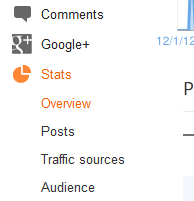
Use "Don't track your own pageviews" link. A small window will appear like this:
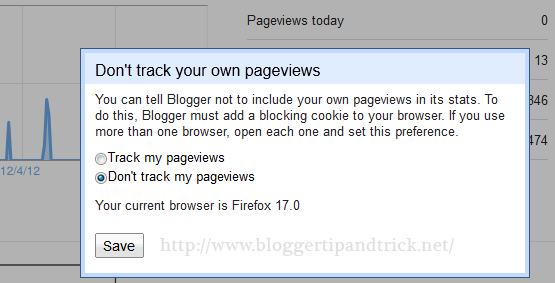
Select "Don't track my pageviews" and click save. Now blogger will not count your visits for stats of your blog.
Note : To do this, Blogger must add a blocking cookie to your browser. If you use more than one browser, open each one and set this preference.
File Under : basic
If I do this then my no. of views will go to ZERO 😛
thanks for your info,
if i want to stop tracking my pageviews, it easy to do it. 😀
i do it, but when i close my account and re open it, i found that it back to "track my pageviews" idk how i can save the second option.
You have disabled the cookies. Try allowing to save cookies.
Whats new in this ? Its very simple common
What do you mean disabled a cookie???!!!
i did this but the same number remains. and i just started my blog yesterday so im pretty sure i dont have 60 views. how do i change this.
hello , i have an author in my blogspot , how can i deactivate pageviews for him so it won't be tracked ?