This tutorials will show you how to add a Flickr photostream to your blogger blog.If you like to add this widget to your blogger blog,then follow the steps given below.

1.First login to your Flickr account.
2.Now click on "Your Photostream".
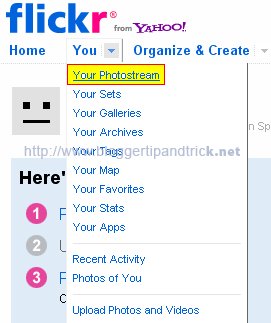
3.Now you are in the your flickr Photostream page.

4.Look at the address of the address bar of your browser.It will look like this:
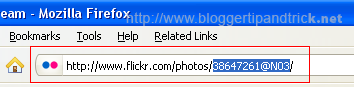
5.Now can see your Flickr ID.It will be something like this:
38647261@N03
6.Now copy your Flickr ID.
7.Login to your blogger dashboard-->Layout > Page Elements
8.Click on 'Add a Gadget'.
9.Select 'HTML/Javascript' and add the code given below and click save.
<style type="text/css">
.flickr_badge_image { float: left; }
#flickr_badge_wrapper { width: auto; border: 1px; }
#flickr_badge_uber_wrapper { width: auto; }
</style>

<script src="http://www.flickr.com/badge_code_v2.gne?show_name=1&count=8&display=random&size=s&layout=y&source=user&user=YOUR-FLICKR-ID" type="text/javascript"></script>
Note : Replace YOUR-FLICKR-ID with your Flickr ID.
File Under : image
hmmm...its add we're album to the blog right?
ic ic ic
Thanks... i was added it on my blog demo