When you want to add an unordered link list to your Blogger blog and you don't know how to write HTML, easiest option is the "Link List" widget is provided by Blogger. But still there are no options in this widget to add a link as a nofollow link or open that link in a new browser tab. When we adding external links such as affiliate links to our websites, we should make them nofollow. This tutorial explains how to add nofollow attribute to the links in a Link List widget and how to make them open in a new window/new tab when someone click on them.

1.Go to "Edit HTML" of your blog.
2.Find your Link List widget code. It usually starts with "<b:widget id='LinkList". It will look like this:
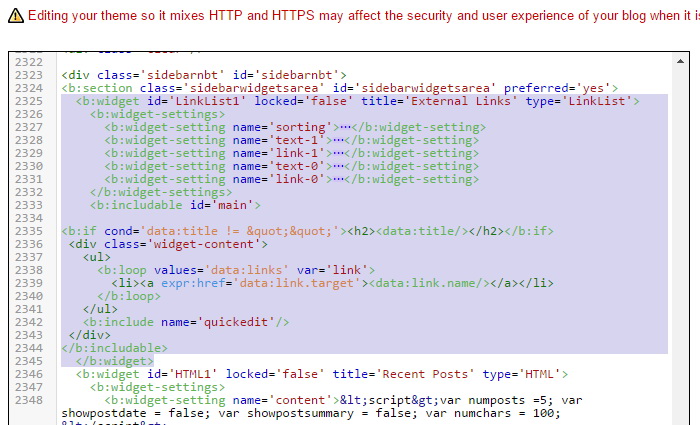
3.Find this line in that code:
<li><a expr:href='data:link.target'><data:link.name/></a></li>
4.Replace it with this code:
<li><a expr:href='data:link.target' target='_blank' rel='nofollow'><data:link.name/></a></li>
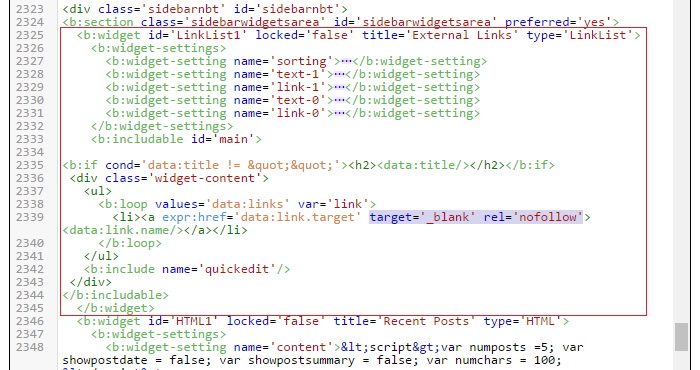
You can see I have added target='_blank' rel='nofollow' to the original code.
Final code will look like this:
5.Save your template. That's it. Now links of the Link List widget have nofollow attribute and they will open in a new tab.
thanks you so much you are such a great blogger user i got succeed after read this i put nofollow "Automatic Link Exchange" in my http://raid-data-recovery-freeware.blogspot.com/ blog
thanks yar
Thanks for this. I was wondering how to do this for future purposes.
Hi i cant find <b:widget id='LinkList on my html template. Please help me. Thanks
Hi, thanks for this. I was also looking for a way to put nofollow tag on widgets. How about on iFrame elements is it the same, and just put the nofollow tag on the link? I am trying to put a nofollow tag on my ads that is why I am asking for it. Lastly, will this not affect my impressions in doing so? thanks!
This post is old though but very useful for me. Thanks so much.